
Scan. Record. Update JD Edwards – directly from the warehouse floor.
XP Mobile Scanning simplifies warehouse transactions in JD Edwards EnterpriseOne. Using a handheld scanner or mobile device, warehouse staff can record goods receipts, move items, perform inventory counts, and adjust stock levels directly at the point of activity. By leveraging existing JD Edwards functionality and business logic, XP Mobile Scanning reduces manual data entry and duplicate work. The result is more efficient warehouse processes, fewer errors, and more accurate inventory data – without the need for a separate warehouse management system.

One Interface. Smoother Workflows. Full Control in JD Edwards.
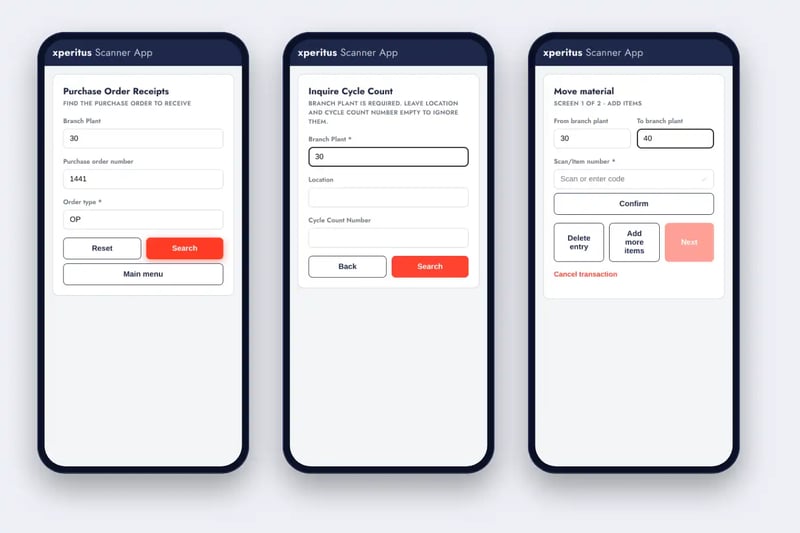
Simplify Warehouse Management with JD Edwards
In many warehouses, daily operations still involve manual tasks. Order numbers need to be retrieved, quantities entered, storage locations checked, and transactions confirmed. When information is entered after the fact, administrative work increases – along with the risk of errors.
XP Mobile Scanning simplifies warehouse operations by making key processes accessible through a mobile-friendly, web-based interface.
Warehouse staff simply scan a barcode, review the information, and confirm the transaction. The data is validated and sent directly to JD Edwards using existing orchestrations.
The solution works with compatible handheld scanners, mobile devices, and tablets, and supports both Swedish and English.
This enables you to streamline warehouse operations while keeping JD Edwards at the core of your business processes.
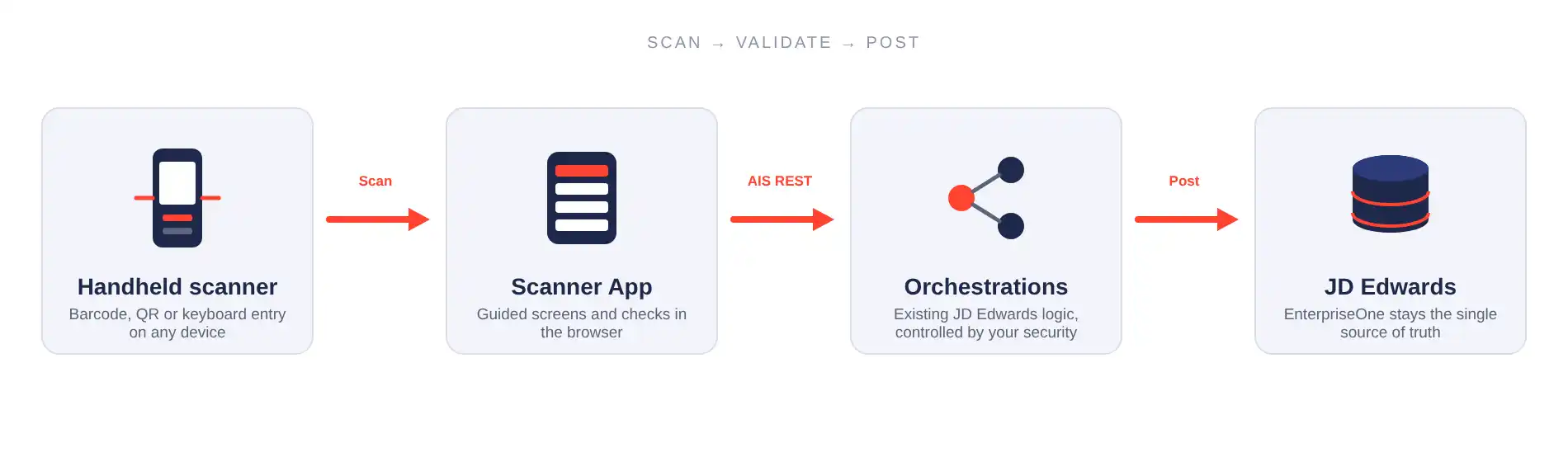
What Can XP Mobile Scanning Do?
Features That Simplify Daily Warehouse Operations
XP Mobile Scanning supports key warehouse processes, from goods receiving and inventory transfers to stock counting and material picking. All features follow the same simple workflow: scan, verify, and confirm.
Goods Receiving
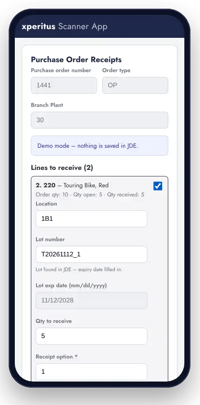
Record incoming deliveries directly at the receiving dock. Scan the purchase order to access open order lines. Enter the storage location, lot number, expiration date, and received quantity. The information is validated against the purchase order before the receipt is recorded in JD Edwards.
Inventory Transfers
Move items between storage locations or facilities by scanning item and location information. Multiple transfers can be grouped, reviewed, and processed within a single workflow.
Inventory Adjustments
Adjust inventory levels directly on the warehouse floor. Scan the item and storage location, enter the correct quantity and reason for the adjustment, and submit the information to JD Edwards.
Inventory Counting
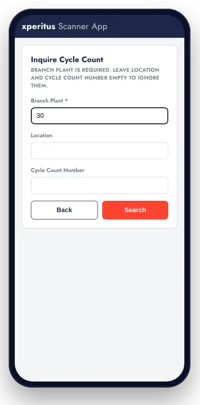
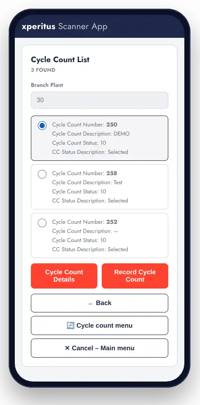
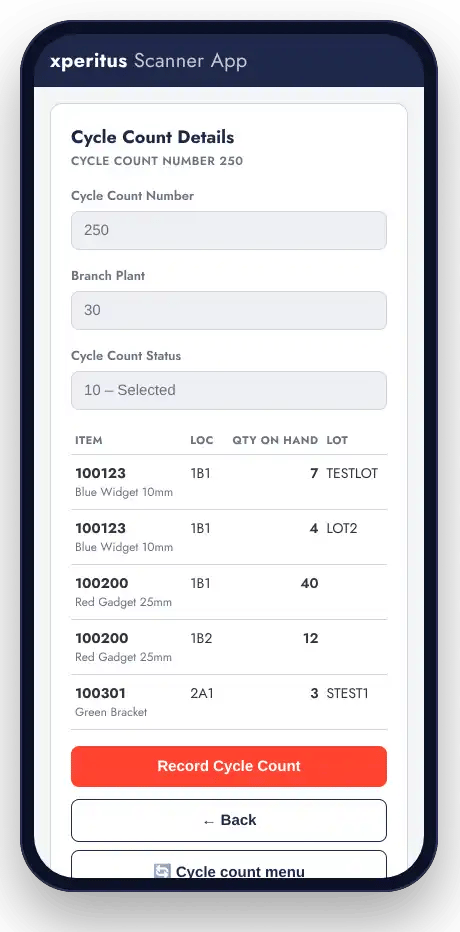
Perform cycle counts with direct access to inventory count data on your mobile device. Record counted quantities at the storage location and update JD Edwards without separate count sheets or manual data entry.
Item Lookup
Find items by scanning a barcode or entering an item description. Access item details and inventory balances directly on the warehouse floor, without returning to a workstation.
Material Picking for Work Orders
Prepare materials for production by scanning components associated with a work order. Capture lot and serial numbers during picking to improve control and traceability.
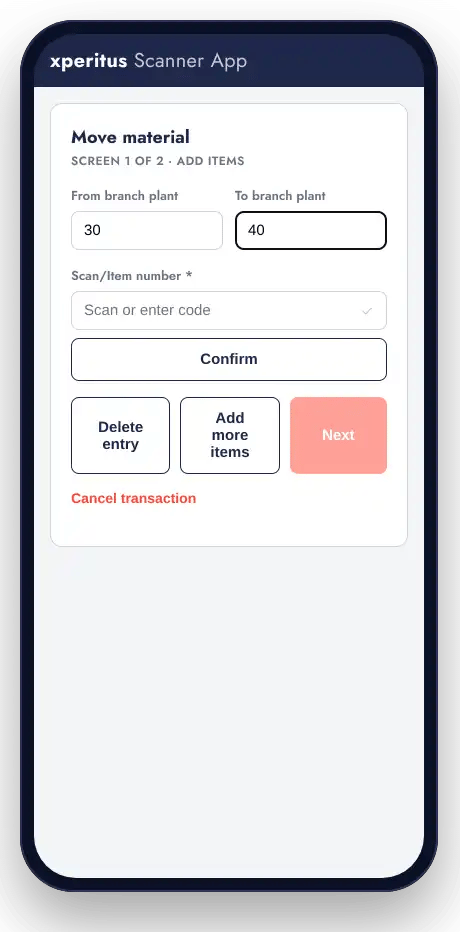
How XP Mobile Scanning Works
You Scan. XP Mobile Scanning Connects. JD Edwards Does the Work.
XP Mobile Scanning provides a user-friendly interface between warehouse staff and JD Edwards EnterpriseOne. By leveraging JD Edwards Orchestrator, transactions are processed according to the business rules and workflows already established in your ERP system.
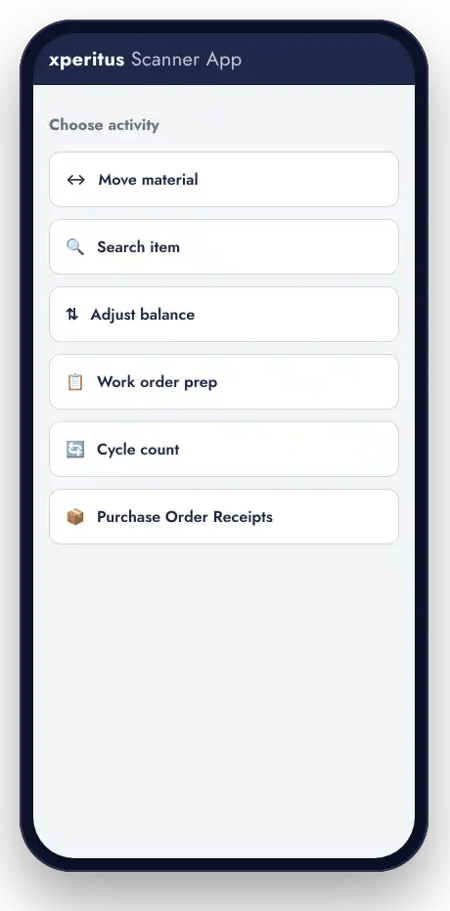
Data flow from scanning to transaction processing in JD Edwards.
- Scan
Warehouse staff scan a barcode using a handheld scanner or enter the information manually. Item numbers, storage locations, and other details can be populated automatically depending on the barcode content. - Validate
XP Mobile Scanning checks that all required fields are completed and that quantities, dates, and codes are correctly formatted before submitting the information. - Process
The information is sent via AIS to a JD Edwards orchestration, where the transaction is processed using existing business logic. The result is immediately communicated back to the user.
Secure Access with Existing User Permissions
XP Mobile Scanning leverages JD Edwards’ existing user management and security framework. Each user logs in with their JD Edwards credentials, while access is controlled by their assigned permissions and available orchestrations.
The solution does not require direct database access and can be deployed within your own IT environment.

Flexible and Scalable Solution
XP Mobile Scanning is built on JD Edwards Orchestrator and can evolve as your business needs change.
New features can be developed by combining tailored user interfaces with new or existing orchestrations. This allows you to enhance warehouse processes without building a separate integration for every new feature.

From Manual Processes to Up-to-Date Inventory Data
What if every warehouse transaction could be recorded right where it happens?
A delivery arrives. A pallet is moved. An item is counted. An inventory balance needs adjusting.
Instead of taking notes on paper, returning to a workstation, or entering transactions later, warehouse staff can complete these tasks directly on their mobile devices.
During goods receiving, deliveries can be verified and recorded on the spot. When inventory is moved, the information is updated as the transfer takes place. During stock counting, quantities are recorded directly against the inventory count records in JD Edwards.
This closes the gap between physical warehouse operations and the information in your ERP system.
You Scan. JD Edwards Updates.
Benefits of XP Mobile Scanning
Designed for Warehouse Operations
A clear, mobile-friendly interface focused on one task at a time. Barcode scanning reduces manual data entry and helps warehouse staff work more efficiently.
Fewer Errors and Better Data Quality
Validating required fields, quantities, and item information before processing reduces the risk of incorrect transactions and the need for subsequent corrections.
Use Your Existing Devices
The web-based solution works with compatible handheld scanners, industrial mobile devices, tablets, and smartphones. Barcode scanners that function as keyboards require no additional drivers.
Keep JD Edwards at the Core
Existing business rules, user permissions, and processes remain managed within JD Edwards. XP Mobile Scanning enhances your ERP system by simplifying everyday warehouse transactions.
Built for JD Edwards. By People Who Know JD Edwards.
Streamlining warehouse operations is about more than scanning barcodes.
It’s about understanding how inventory management, purchasing, production, and business processes work together – and how they operate within JD Edwards EnterpriseOne.
XP Mobile Scanning was developed based on our extensive experience with JD Edwards and the challenges we see our customers face in their daily operations.
We know how much time can be spent on manual data entry, duplicate work, and correcting inventory information. That’s why we developed a solution that simplifies day-to-day warehouse operations while making the most of your existing ERP system.
With over 25 years of experience, more than 35 ERP consultants, and an Oracle partnership dating back to 2008, xperitus combines technical expertise with a deep understanding of business processes.
Ready to Simplify Warehouse Operations in JD Edwards?
You don’t need to transform your entire warehouse operation at once.
Start with a specific process – such as goods receiving, inventory counting, or inventory transfers – and discover how XP Mobile Scanning can streamline your daily operations.
We’ll show you how the solution works with JD Edwards EnterpriseOne and help you identify the processes where it can deliver the greatest value.

More Possibilities with JD Edwards
XP Mobile Scanning is part of xperitus’ solutions designed to enhance and streamline operations in JD Edwards EnterpriseOne.
With XP Flow MCP, you can also connect JD Edwards to AI assistants like ChatGPT and Claude using existing orchestrations.
Together, these solutions open up new possibilities for capturing, accessing, and analyzing data within your ERP system.