Analytix – smarter reporting and analytics in JD Edwards
Get a better overview of your business and make well-founded decisions with Analytix. Create reports, dashboards and KPIs directly from JD Edwards EnterpriseOne and access up-to-date information whenever you need it. Using your existing permissions, and with no need for separate data warehouses or complex integrations, analysing your business data becomes easier. The result is faster insights, better decision support and less time spent on manual reporting.

From data to better decisions – gain valuable insights, faster decision-making and full control over your business data with affordable real-time reporting directly in JD Edwards.
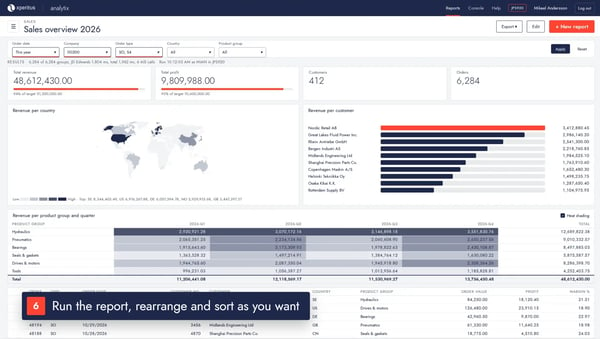
Get more out of the information in JD Edwards
JD Edwards holds large amounts of valuable business information. But making that information accessible, understandable and useful in day-to-day decision-making can be a challenge.
Analytix gives you a flexible reporting and analytics tool that lets you work in a more data-driven way, without having to build complex solutions alongside your ERP system.
Up-to-date information when you need it
Analytix retrieves data directly from JD Edwards via AIS (Application Interface Services). This means reports and analyses are based on current information, with no need for separate data warehouses or scheduled data transfers.
Simpler reporting and follow-up
Create reports, dashboards and KPIs based on your business needs. With an intuitive interface, users can select, compile and visualise information themselves, without extensive technical knowledge.
Security and control
Analytix uses your existing user permissions in JD Edwards. Each user gets access to the information their role allows, while the solution works with read-only access to the ERP system.
From business data to actionable insights
Analytix is designed to simplify the entire process – from retrieving information in JD Edwards to presenting and distributing finished decision support.
1. Select and compile information
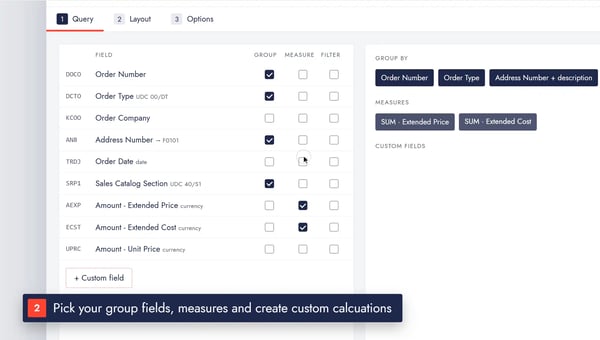
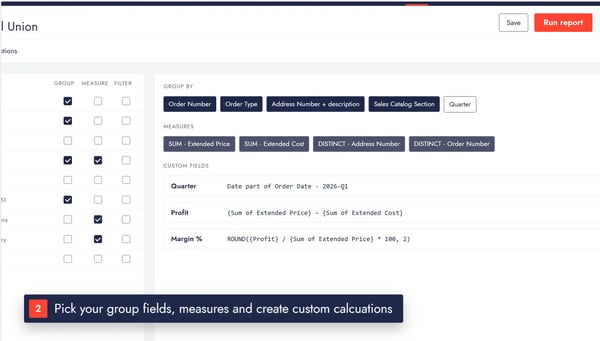
Search the tables and views in JD Edwards and choose the information to analyse. Combine data from different parts of the system, apply filters and create your own calculations to get exactly the data you need.
2. Visualise and analyse
Present the information in clear dashboards with charts, KPIs, pivot tables and other visualisations. Tailor the layout of your reports to different roles and needs across the organisation.
3. Share and automate
Save reports and share them with colleagues, or schedule recurring reporting. Finished reports can be distributed automatically by email or file transfer in PDF or Excel format.
The result is a more efficient reporting process where the right information reaches the right people at the right time.
xperitus MCP for JDE speaks Analytix – let AI create your reports, BI insights and dashboards.

Better decision support across the business
Whether you work in finance, sales, purchasing or business management, Analytix helps you get a better overview and faster answers to key business questions.
Sales and customer analysis
Track sales performance by customer, item or region. Identify customers who have not purchased within a given period and spot changes in buying behaviour.
Finance and profitability
Analyse margins, compare periods and follow up on your key financial metrics. Create clear reports that support both ongoing follow-up and strategic decisions.
Management and business performance
Bring key KPIs together in clear dashboards and give management and decision-makers a shared view of how the business is developing.
Automated reporting
Let recurring reports be generated and distributed automatically. For example, a weekly sales report can be delivered straight to the responsible managers every Monday morning.

Features that make a difference
Analytix combines advanced analytics with a user-friendly way of working.
Flexible data analysis: Combine information from multiple tables, create your own calculated fields and use dynamic filters to analyse data from different perspectives.
Interactive dashboards: Build dashboards with charts, KPIs, maps and pivot tables. Tailor the presentation to users, tasks and information needs.
Automated report distribution: Schedule reports and distribute them as PDF or Excel by email or SFTP. Reduce manual work and ensure consistent reporting.
Collaboration and structure: Organise reports in folders, share them with colleagues and manage different versions. Each user can also personalise their own start view.
Easy to get started: With built-in documentation and guided features, users get support directly in the tool.

Built for JD Edwards – with security in focus
Analytix is designed to work together with JD Edwards EnterpriseOne and take advantage of the system's existing structure and security model.
The solution is installed in your own IT environment and communicates with JD Edwards via AIS. This means, among other things, that:
-
Data is retrieved directly from JD Edwards without the need for a separate data warehouse.
-
Existing user permissions in JD Edwards are respected.
-
Analytix has read-only access and does not change any information in the ERP system.
-
Sensitive details for scheduling and distribution are stored encrypted.
-
You keep control over your information and your technical environment.
This provides a secure and integrated solution for reporting and analytics, tailored to companies that use JD Edwards.
xperitus – your partner for getting more value from JD Edwards.
At xperitus, we have extensive experience in helping companies develop, streamline and get greater business value from their ERP solutions.
As an Oracle Partner with deep expertise in JD Edwards, we understand both the technology and the business processes the system supports.
With Analytix, we can help you make your business information more accessible and create better conditions for follow-up, analysis and data-driven decisions.
-
More than 25 years of experience with JD Edwards
-
Oracle Partner since 2008
-
More than 35 ERP consultants in the Nordics
Discover what Analytix can do
Would you like to simplify your reporting and get better access to the information that already exists in JD Edwards?
We'd be happy to show you how Analytix works and discuss how the solution can be used based on your needs and your existing JD Edwards environment.